Websites and automations, so you can get your time back
See how they turn out, pick what works for you, and have the price in writing before we start. Automations do the repeated tasks on their own, so you have more time for what’s yours.
This is how our sites turn out
These are three demos with fictional businesses, and each one says so at the top. They are in Spanish. Tap one and walk through it on your phone.
-
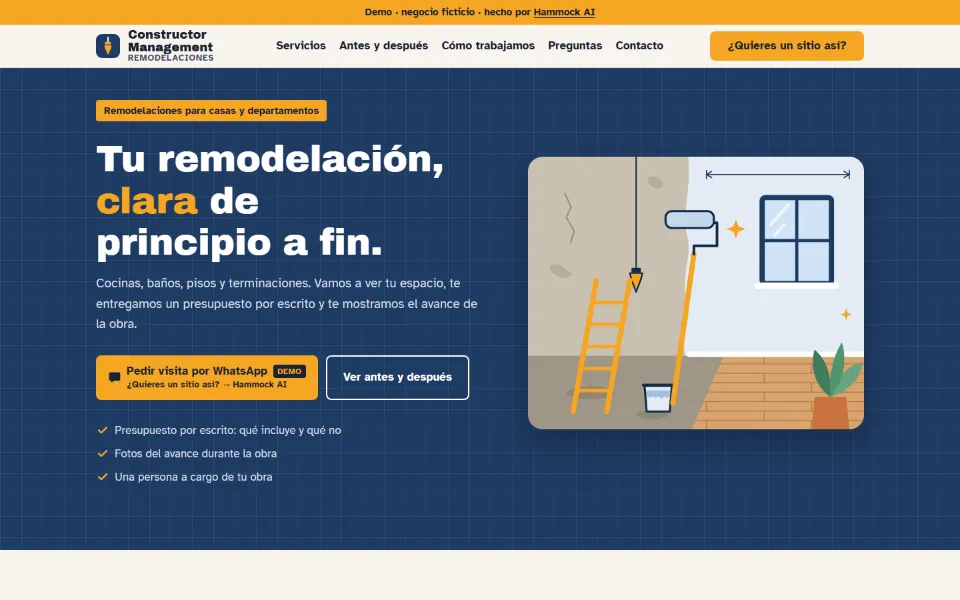
Technical details
- A single page with 8 sections: home, what we do, before and after, how we work, a call to get in touch, about us, FAQ and contact.
- WhatsApp button with the message already written (“Hola, quiero pedir una visita.”, in Spanish). In the demo it leads to this site; on a real site it opens the business’s WhatsApp.
- Everything on one page, with no menus that send you to others.
- Designed phone-first and adapted to larger screens.
- It has a skip-to-content link, a visible focus ring for keyboard use, and it respects people who ask for less motion.
- No trackers and no resources from other domains: everything loads from the same site.
- Weighs about 129 KB uncompressed (text, styles, code and images).
- Its own fonts (Archivo Black and Atkinson Hyperlegible), included in the site.
- It is a demo with a fictional business, and the page itself says so.
- Matches the One page plan. The plan adds the contact form.
-
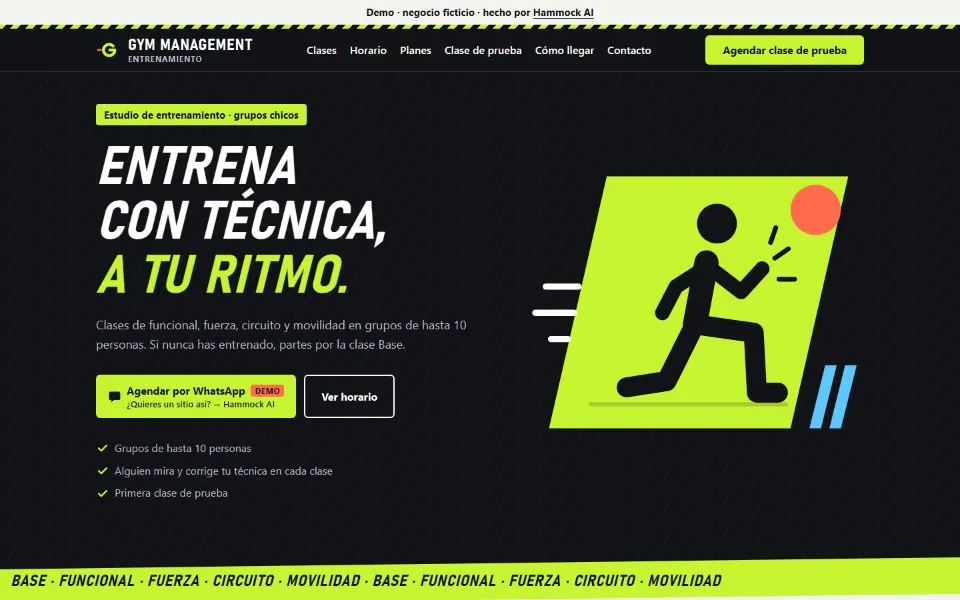
Technical details
- A single page with 9 sections: home, classes, weekly schedule, plans, trial class, team, FAQ, how to get there and contact.
- WhatsApp button with the message already written (“Hola, quiero agendar mi clase de prueba.”, in Spanish). In the demo it leads to this site; on a real site it opens the business’s WhatsApp.
- Everything on one page, with no menus that send you to others.
- Designed phone-first and adapted to larger screens.
- It has a skip-to-content link, a visible focus ring for keyboard use, and it respects people who ask for less motion.
- No trackers and no resources from other domains: everything loads from the same site.
- Weighs about 79 KB uncompressed (text, styles, code and images).
- Uses the device’s fonts: it downloads none.
- It is a demo with a fictional business, and the page itself says so.
- Matches the One page plan. The plan adds the contact form.
-
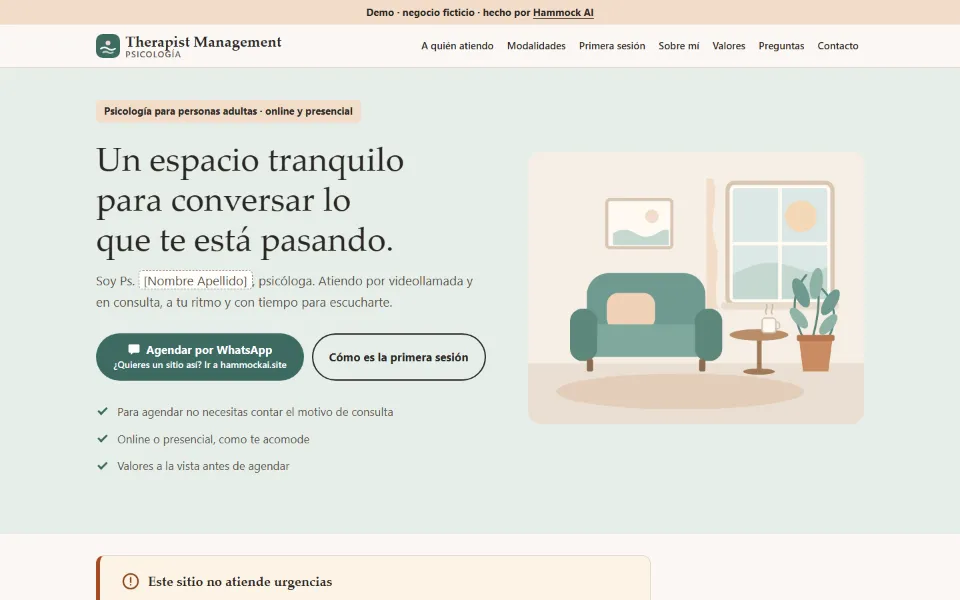
Technical details
- A single page with 8 sections: home, who I see, online or in person, first session, about me, values, FAQ and booking.
- WhatsApp button with the message already written (“Hola, quiero agendar una hora.”, in Spanish). In the demo it leads to this site; on a real site it opens the business’s WhatsApp.
- Everything on one page, with no menus that send you to others.
- Designed phone-first and adapted to larger screens.
- It has a skip-to-content link, a visible focus ring for keyboard use, and it respects people who ask for less motion.
- No trackers and no resources from other domains: everything loads from the same site.
- Weighs about 65 KB uncompressed (text, styles, code and images).
- Uses the device’s fonts: it downloads none.
- It is a demo with a fictional business, and the page itself says so.
- Matches the One page plan. The plan adds the contact form.
A clear price, a clear timeline
The time AI saves us comes straight off your price.
Price follows the country of the paying business.
-
One page
Rest of the world: USD 450Chile: From CLP 150,000
10 business days
A clear message and a clear way to reach you.
- Template in your colors and logo
- Up to 10 sections and 8 photos
- WhatsApp button with your number
- A form to your email and spreadsheet, included to get you started
- 1 round of changes
One page gathers everything in one place. If you’d rather give each service its own page, so each one can show up in searches for that service, that comes with the Simple website.
Technical details
- One page on one of the portfolio templates, adapted with your colors (variables in
:root) and your logo. Contact without a server:wa.melinks with the message written,tel:andmailto:. - You send the texts and photos with a guide form; we organize and polish them. No writing from scratch.
- Inquiries arrive by WhatsApp, phone, email or the form (included): what is stored, where, and in whose name is in the form’s technical details, further down. The site’s CSP opens only to the exact Google script URL (
form-actionandconnect-src). - Everything shared (hosting, security, accessibility, search, images) is under “What’s inside”.
- Search: a single page has one title, one address and one topic, so it can match fewer searches. In the Simple website each page gets its own title, address and topic (for example, one per service). Nobody can promise a position on Google: it also depends on your Google listing, reviews and competition.
See an example: demo of a made-up training studio (opens in a new tab)
-
Simple website
Rest of the world: USD 990Chile: From CLP 290,000
20 business days
Your business in a few pages: who you are, what you offer, your work and how to reach you.
- Up to 5 pages and 20 photos
- A form to your email and spreadsheet
- WhatsApp button with your number
- 2 rounds of changes
Technical details
- Up to 5 pages (home, services or prices, work or a gallery of up to 20 photos, FAQ, contact) on an adapted template. The map is a link, with no embedded map that tracks visitors.
- Includes the form: what is stored, where, and in whose name is in the form’s technical details, further down. The site’s CSP opens only to the exact Google script URL (
form-actionandconnect-src). - Everything shared (hosting, security, accessibility, search, images) is under “What’s inside”.
See an example: demo of a made-up psychology practice (opens in a new tab)
-
Custom website
Rest of the world: From USD 2,500Chile: From CLP 690,000
30 business days
Your own design, no template, built from your brand. Final price once we know your project.
- A diagnosis: what works today, what’s missing and what to say first (for your business and for your current site, if you have one)
- A style guide and a mockup you approve before we build
- Your own design, from your brand, no template
- Up to 8 pages, with texts written with you in a 45-minute interview
- A form to your email and spreadsheet, plus booking or a catalog with “Order on WhatsApp” (your choice)
- 3 rounds of changes and a 30-minute guided handover by video call
Technical details
- Process: (1) diagnosis: we read your current site as a visitor (what works, contact from a phone, trust, local search, language) and mark what is verified and what isn’t; (2) style guide: what you offer and to whom, the main action, what is fixed (name, logo, your texts) and what is free (palette, fonts, layout), language and what’s missing; (3) an HTML mockup for you to approve; (4) only then do we build. On the same technical base as “What’s inside”: no frameworks, strict CSP, automated and manual review.
- Own design: no template; colors and fonts come from your brand. Fonts under an open license (OFL) are hosted on the site itself, never from Google Fonts.
- Up to 8 pages, texts written with you, 3 rounds of changes (one message with all your changes in a list counts as one round).
- Automations included: the form (→ email + spreadsheet) and one of these two: booking with reminder or a catalog with “Order on WhatsApp”. Service, account, data and third-party costs are in each add-on’s technical details. A catalog with more than 20 products with photos adds an extra tier.
- Interview and handover: a 45-minute interview to write the texts with you and, at the end, a 30-minute guided handover by video call.
See an example: demo of a made-up remodeling business (opens in a new tab)
The examples start from a template. In this plan, your design starts from scratch.
What’s inside every site
This comes with every site we build, even if you can’t see it at a glance: we check it before handing your site over. It applies to every plan.
- Checked before we hand it over. We run your site through a security checklist and a tool that reads it file by file, and we fix what turns up. It’s a check, not a guarantee: we look at the most common weak spots.
- Easy to read and use for more people. We check that text has good contrast, photos have a description, everything works with just a keyboard, and the text can be enlarged (using a checklist based on the international web accessibility guidelines, WCAG 2.2 level AA). That way more people can use your site, including people who use a screen reader.
- The basics for Google to understand you. Each page gets its own title and description with your trade and your town, your contact details in a format Google can read, and a site map. Nobody can promise first place: it also depends on your Google listing, your reviews, your competition and time.
- Built for phones. It’s designed for phones first: buttons are easy to tap with a thumb, nothing gets cut off or slides sideways, and the WhatsApp button opens with your message already written. Photos are resized so they load faster.
- In your name, with no trackers. Your domain and the account where your site lives are in your name and your email. The site has no trackers and no pieces from other sites that report every visit. And it stays online even if you don’t sign up for maintenance.
- A guide to use it. You get your files in a .zip (they’re yours) and a short guide in plain words: how to protect your accounts, how to ask for changes and what to do if something breaks. If you ever want to switch providers, you can.
Technical details
- Code: semantic HTML5, hand-written CSS (colors and sizes as variables in
:root) and framework-free JavaScript (the base ships ~2.6 KB). No CDNs, no build step, no dependencies. - Hosting: Cloudflare Pages (free plan), on an account in the client’s name, with two-factor authentication on. Published by uploading the site folder. The domain is registered in the client’s name. HTTPS: after publishing we check that
http://andwwwredirect tohttps://. - Security headers: a
_headersfile with a strict Content-Security-Policy (no'unsafe-inline'or'unsafe-eval',frame-ancestors 'none'),X-Content-Type-Options: nosniff,Referrer-Policy: strict-origin-when-cross-origin,Permissions-PolicyandX-Frame-Options: DENY. The same CSP goes in a<meta>on every page. We check live that the real headers match_headers. - Security review: our own plain Node script, with no dependencies and no network access, reads the files and looks for secrets, inline scripts, resources from other domains, tracking code and missing headers. To hand over, it must exit with 0 critical and 0 high findings. Then a manual review by Security (the crew’s security agent), only on what the client authorizes in writing. It is not a penetration test: it doesn’t look at the live site, the account or DNS.
- Accessibility: WCAG 2.2 AA checked by hand against a checklist:
lang, a singleh1and headings in order,alton images, 4.5:1 contrast (3:1 for large text), keyboard-only use with a visible focus ring,prefers-reduced-motionand 200% zoom. For mobile Lighthouse we aim for performance ≥ 90 and accessibility ≥ 95: those are targets, not measurements taken on clients. - Search: unique
<title>, meta description andh1per page, with trade and town;canonical, Open Graph (og:image1200×630),sitemap.xmlandrobots.txt;LocalBusinessstructured data (JSON-LD) using only details the client confirmed, checked at validator.schema.org. Google Business Profile: if the client already has one, we check that name, address and phone match the site. - Images and weight: WebP at ~1200 px, with
widthandheightandloading="lazy"(except the first visible one). Targets: photo ≤ 200 KB and first load ≤ 500 KB; they are targets, not measurements taken on clients. - Cookies and tracking: no cookies and no trackers in the site’s files (checked on the base and the demos); no fonts, maps or videos embedded from other domains. That applies to the site’s files; what Cloudflare’s network adds on its own is outside our control.
- Handover: the full folder in a .zip, a client guide, and a delivery checklist run in full (zero pending placeholders, photos with permission, photo and font credits).
Let your site work for you
Extras that do repetitive tasks on their own and connect to your site. One-time payment to set it up, in your name. Email has a separate subscription with the provider.
These are new automations: their parts are tested separately, and before we hand them over we test them end to end with real accounts.
Price follows the country of the paying business.
-
Contact form
Rest of the world: From USD 150Chile: From CLP 85,000 · 3 business days
BeforeRequests by chat, calls and scraps of paper.
AfterEvery request reaches your email and lands in your spreadsheet.
Technical details
- Included in all three plans. If you ask for it on its own, it’s a one-time payment.
- What it uses: a Google Sheets spreadsheet with a Google Apps Script, in your Google account. The site posts the form to that script’s exact URL. No server of ours.
- Where the data lives: the sender’s name, email or phone and message land in the “Consultas” tab of your spreadsheet (your Drive) and in the alert sent to your inbox. They pass through Google, which is already your provider: no new third party is added. We can see the spreadsheet only while we hold editor access, and we remove it at handover (if you sign up for maintenance, for as long as it lasts).
- Whose account: yours. You do the install with your own login, guided by us. Nobody asks for or writes down your password.
- Third-party cost: $0 a month on a free Google account. Google’s limit: 100 email recipients a day per account, shared with booking (the form leaves 30 free for reminders); Google can change these limits without notice.
- Safeguards: a honeypot field against bots, a brake if more than 20 complete inquiries arrive in an hour (it alerts you and visitors see the WhatsApp button), protection against malicious spreadsheet formulas, minimal permissions (only that spreadsheet and sending you the alert) and an off switch.
- If it fails: the site tells the person to write on WhatsApp, and the WhatsApp button and email stay on the site.
- What data it asks for: the minimum needed to reply (name, contact and message). It isn’t meant for sensitive data (health, ID numbers, cards, passwords); use another channel for that.
-
Booking
Rest of the world: From USD 220Chile: From CLP 110,000 · 5 business days
BeforeYou arrange every appointment by message.
AfterYour clients book on their own and get an email reminder.
Technical details
- What it uses: Google Calendar’s free booking page (one per personal account) plus a Google Apps Script that, around 6 pm each day, emails a reminder to whoever has an appointment the next day. The site links to the booking page (it doesn’t embed it).
- Why a script and not Google’s own reminder: Google Calendar’s native automatic email reminder is a paid feature (Google One Premium, Workspace Individual and higher plans). The script replaces it on your free account.
- Where the data lives: the appointment sits in your Google Calendar, with the booker’s name and email. The script keeps only the masked email (ju***@…) in its “Registro” tab, which clears itself after 60 days. The data doesn’t pass through any other third party.
- Whose account: yours; you install it with your own login, guided by us. Nobody asks for your password.
- Third-party cost: $0 a month on free accounts. Google’s limits: 100 email recipients a day (shared with the form) and 90 minutes a day of triggers; they can change without notice.
- Safeguards: only appointments you created are reminded, with up to 3 guests; minimal permissions (read the calendar, write to that spreadsheet, send email) and an off switch for reminders.
- What it’s for: booking appointments and reminding people by email. It asks only for name and email; it isn’t meant for health data or reasons for a visit (if you need clinical records, payments or WhatsApp reminders, you need a system built for that, and professional advice is wise). The booker’s email is not verified.
- If it fails: Google alerts you and the script emails “Check tomorrow’s reminders”; the fallback is to notify people by WhatsApp by hand.
-
Spreadsheet catalog
Rest of the world: From USD 320Chile: From CLP 160,000 · 8 business days
BeforeChanging a price means editing the site.
AfterYou edit a spreadsheet and the site updates itself.
Up to 20 products; rest of the world: +USD 40 · Chile: +CLP 25,000 for every 10 more.
Technical details
- What it uses: a Google Sheets spreadsheet with a “Catalogo” tab published to the web → a Cloudflare Worker (in the site’s Cloudflare account, which is yours) that reads, cleans and caches the catalog for 5 minutes → the site builds the product cards. Each product has a button that opens
wa.mewith the product and price already written; the person decides whether to send. - Where the data lives: only the catalog (product, description, price, availability, photo, category), which is public. It doesn’t touch customer data: the order happens in your WhatsApp and the person writes first. Visitors to your site never talk to Google. Private data goes in a different spreadsheet, never in the published one.
- Whose account: yours (Google and Cloudflare). You set up the spreadsheet with your Google login; the Worker, with your Cloudflare login or by inviting us as a member of your account, and you remove us when we’re done.
- Third-party cost: $0 a month. Cloudflare Workers free plan: 100,000 requests a day and 10 ms of CPU per request; the Worker reads up to 120 rows. If someone uses up the day’s requests, the catalog comes back at midnight UTC and meanwhile the WhatsApp block shows. Google and Cloudflare can change these limits.
- Package limits: up to 20 products with photos (more, in tiers of 10). Spreadsheet changes take a few minutes to show. New photos must be uploaded to the site (with maintenance or an extra hour).
- A “watchdog” (another Google script) emails you if the catalog doesn’t load or arrives truncated.
- What it’s for: showing your products and receiving orders on WhatsApp. You mark “sold out” yourself in the spreadsheet, and you agree on payment with your customer on WhatsApp.
- If it fails: the site shows “We couldn’t load the catalog… write to us on WhatsApp”; if Google fails for a while, it shows the last copy (up to 6 hours, labeled as a backup).
- What it uses: a Google Sheets spreadsheet with a “Catalogo” tab published to the web → a Cloudflare Worker (in the site’s Cloudflare account, which is yours) that reads, cleans and caches the catalog for 5 minutes → the site builds the product cards. Each product has a button that opens
-
Basic identity
Rest of the world: USD 350Chile: CLP 130,000 · 6 business days
BeforeEvery piece has different colors and fonts.
AfterA palette, 2 typefaces, a logo with your business name and a 1-page guide.
-
Email on your domain
Rest of the world: USD 75Chile: CLP 45,000 · 2 business days
BeforeAfterOn Proton or Google, in your name. You pay the subscription to the provider, with no markup from us.
What you pay, when, and to whom
This is everything you pay, with no surprises. Your plan is paid once; everything else is in your name or optional.
-
One-time
Your plan
- The price of your plan, which you see in writing before we start
- 50% to start and the rest on delivery
- Paid to Hammock AI
- What comes with your plan isn’t charged again. Add-ons you ask for (booking, catalog, identity, email) are also a one-time payment, priced in your quote
-
Every year
Your domain
- A .com domain: about USD 11 a yearA .cl domain: CLP 9,990 a year
- You pay it, in your own name and with your email, wherever you buy it (the registrar)
- It’s a good idea to keep auto-renewal on so it doesn’t expire
-
Every month
Optional
- Maintenance: USD 39 a month or USD 390 a yearCLP 12,000 a month or CLP 120,000 a year, no lock-in. Paid to Hammock AI
- Includes a monthly check of your site, up to 30 minutes of small changes a month (they don’t carry over), a heads-up 30 days before your domain renews, and a copy of your files whenever you ask
- If you don’t take it, your site stays online
- Email with your domain (only if you ask for that add-on): a subscription with the provider (Proton or Google), in your name and with no markup from us. The provider sets the price
$0 a month on today’s free plans: the place your site lives (your free Cloudflare account) and the form, booking and catalog (on your free Google and Cloudflare accounts).
Technical details
- Hosting at $0: Cloudflare Pages, free plan, on your account. That plan’s limits today: 500 deployments a month, 20,000 files per site and 25 MiB per file; it states no visitor limit for static files. Free plans and limits at Cloudflare and Google can change.
- Form and booking at $0: a free Google account; the emails they send go out from your account, with a limit of 100 recipients a day (shared between both). You don’t pay an email subscription for them.
- Catalog at $0: Google Sheets and a Cloudflare Worker on your account, free plan (100,000 requests a day).
- Domain: bought in your name; if you buy it at Cloudflare Registrar, auto-renewal is on by default (at list price); at another registrar, we check it in its dashboard. Without renewal, the site and any email on that domain stop working.
- Maintenance: optional with no lock-in; anything beyond 30 minutes a month is quoted before we do it. If you cancel, the site, the files and the domain remain yours.
Rest of the world: prices in US dollars. Your site comes in English and Spanish, included.
Chile: prices in Chilean pesos (CLP). Your site comes in Spanish and English, included.
Questions
How long does it take?
One page, 10 business days; simple website, 20; custom, 30. The count starts when you send your texts and photos.
Who owns the site?
You do: files, domain and content, with documentation in plain language.
What isn’t included?
A logo with a drawn symbol, a photo shoot, an online store with payments, a blog or advertising.
Does the AI do it all on its own?
No. The agents do the heavy lifting in small steps and the developer reviews it with you before it's delivered.
Which AI do you use?
Our agents run on third-party AI models such as Claude. It isn't magic: with those same models you can build agents like these too. Several of our agents' prompts are open and free on our crew page.
What if I build it myself with AI?
You can, and for a simple page that may be enough. What usually gets left out is the rest of the road: deciding what to say and how to show it, publishing it in your name, checking security and accessibility, helping Google understand where you work, and, if you want, keeping it up to date. That’s what we do for you, so your time stays with your business.
Tell us what site you need
Answer a few questions and get a written quote.
My proposalOr write to [email protected]